Pecunia Merchant (v1.1.0)
Download OpenAPI specification:
Pecunia Wallet provides you the free API to easily receive crypto right to your Pecunia Wallet. There are no fees or limitations: feel free to get donations, conduct real-time commerce, e.g. issue invoices, bills, etc. No excess layers are present: only you, your wallet and your consumer.
Several plug-and-play plugins and SDKs are available. Learn more here.
What we provide
We operate a payment interface and the invoice state-processing engine: invoice creation API, on-chain monitoring, deterministic state transitions and notification delivery. We do not custody funds — all payments occur directly on the blockchain to merchant-controlled addresses.
Data retention
Invoice records are retained for one month and then irreversibly deleted. This retention period is indicative and may change; merchants should not rely on the platform for long-term archival. Historical invoice data is provided for convenience and operational visibility only and is not a guaranteed legal record.
Merchant obligations
Merchants must:
- use the service in good faith and in compliance with applicable laws and this platform's terms;
- provide and maintain a reachable callback endpoint(s) that responds with HTTP 2xx under normal conditions;
- implement idempotent handling of callbacks, tolerate duplicates and out-of-order deliveries, and respect platform rate limits;
- securely store and rotate any API credentials or secrets issued to them; and
- handle business logic not covered by the platform (for example, surplus/overpaid funds handling, refunds, accounting and dispute resolution).
Operational limits and enforcement
The platform provides best-effort delivery and monitoring features, but does not guarantee delivery, ordering or indefinite storage. In case of abusive or non-compliant behaviour (including repeatedly failing to acknowledge callbacks, malicious activity, or breaches of terms), we reserve the right to suspend or terminate the merchant's access, and to disable optional features such as callback delivery. Nevertheless, we are not able to restrict access to the wallet functions.
Practical recommendations
- Export or archive any long-term records you require before they age out of the platform.
- Keep a robust, idempotent consumer for callbacks and a fallback polling strategy
(
GET /invoices/{id}) for authoritative state. - Monitor your callback endpoint and provide support contact information to ensure prompt remediation of delivery problems.
Each client is limited to 250 requests per 10 seconds per IP address. This is a soft-enforced, best-effort limit intended to protect platform stability.
Behaviour on exceed
Exceeding the limit may result in HTTP 429 Too Many Requests or temporary rejections.
There is no guaranteed Retry-After header — clients must implement their own
retry/backoff logic and treat 429 as transient.
Client responsibility
Clients (merchants) are responsible for tracking their own usage and implementing client-side throttling, exponential backoff, idempotent retries and any batching needed to avoid hitting the limit. Monitoring and alerting on the client side is recommended.
No per-account notification
Because access is tied to wallet identifiers rather than user accounts, we cannot automatically notify merchants of changes to service rules. The rate limit and other operational rules may change; merchants must monitor the service documentation/announcements and adapt accordingly.
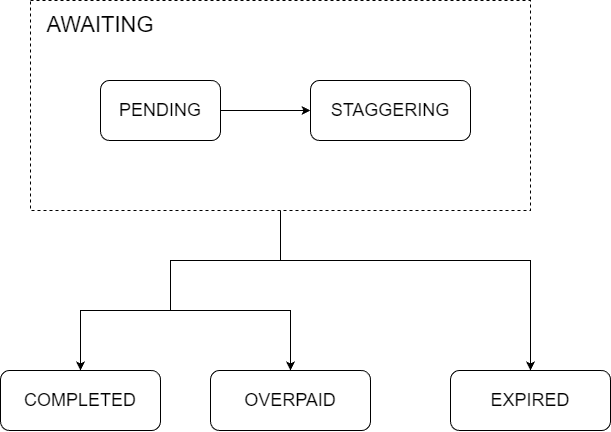
State transitions
Transitions are driven by blockchain observations (new transactions, confirmations) or internal timers. Functionally there are two non-final internal sub-states grouped as AWAITING (PENDING and STAGGERING) and three final states: COMPLETED, OVERPAID, EXPIRED. All outward transitions from the AWAITING group lead to one of the final states; the only internal transition inside the group is PENDING → STAGGERING.
PENDING
PENDING is the normal awaiting-payment state after invoice creation. The invoice remains in PENDING while waiting for relevant on-chain transactions to appear or reach sufficient confirmations. If a detected transaction already meets finality and amount criteria at detection time, the invoice may transit directly from PENDING to a final successful state. If invoice expires and unconfirmed transactions are insufficient, PENDING will transition to the appropriate final state.
STAGGERING
STAGGERING is an internal extension of PENDING used to manage the case when an invoice's lifetime lapses while there remain unconfirmed transactions that could make the invoice paid once they confirm. Concretely:
When an invoice's lifetime expires, the system evaluates the sum of currently unconfirmed transactions together with already confirmed amounts.
If those unconfirmed transactions are potentially sufficient to satisfy the invoice, the invoice enters STAGGERING.
If the unconfirmed transactions are insufficient, the invoice immediately proceeds to the appropriate final state (COMPLETED, OVERPAID, or EXPIRED) per the amount checks described below.
While in STAGGERING, the invoice continues to be treated as part of AWAITING; the engine will wait only as long as there is a meaningful chance the pending transactions will produce a successful payment. The invoice leaves STAGGERING and moves to a final state when any of the following becomes true:
pending transactions confirm and the confirmed amounts satisfy finalization criteria (leading to COMPLETED or OVERPAID), or
pending transactions are no longer sufficient to reach the payment threshold (so further waiting is futile), or
pending transactions disappear (reorg / mempool eviction) or otherwise resolve so that no meaningful waiting remains.
Important: entering STAGGERING is purely internal and does not trigger callbacks or notifications.
Final states and amount logic
Finalization decisions are based on the invoice amount and its configured inaccuracy.
Define minAmount and maxAmount from the invoice amount plus/minus the configured inaccuracy.
The platform applies the same checks regardless of whether the invoice was in PENDING or
STAGGERING at the time confirmations occurred:
COMPLETED (final — success): entered when
minAmount ≤ confirmedAmount ≤ maxAmount. The invoice is considered paid.OVERPAID (final — success): entered when
confirmedAmount > maxAmount. OVERPAID is also treated as a successful payment; the platform marks the invoice final, and any handling of surplus funds (refunds, credit, accounting) is the merchant's responsibility.EXPIRED (final — failure): entered when waiting is no longer meaningful (TTL elapsed and even after considering pending transactions there is no path to reach
minAmount). The invoice is final and considered not paid.
Important: Because some currency conversions expose limited fractional precision, paying the
exact decimal amount may be impossible. The platform therefore treats a confirmedAmount
within ± one minimal currency unit of the target coin (for example, ±1 satoshi) as satisfying
the minAmount ≤ confirmedAmount ≤ maxAmount check; such payments are considered perfectly paid.
This one-unit tolerance does not alter the merchant's configured inaccuracy bounds.
As a consequence, even with inaccuracy disabled, an invoice finalized as COMPLETED may have
received and requested amounts that differ.
Summary
- PENDING — active waiting for payment.
- STAGGERING — internal extended waiting after expire when unconfirmed transactions might still result in success; does not trigger callbacks.
- COMPLETED / OVERPAID — final, successful (OVERPAID is successful but surplus handling is merchant's responsibility).
- EXPIRED — final, unsuccessful.
- All finalization checks respect the invoice's configured inaccuracy; final states are immutable and trigger the platform's final callbacks as described below.
Callbacks are the authoritative record of an invoice. The callback payload is a snapshot of
the invoice (equivalent to GET /invoices/{id}) provided for convenience.
Every callback is signed via the X-Signature header, which looks like X-Signature: v1=x[, v0=y].
x and y are hex-encoded HMAC-SHA256 signatures of the callback body. v1 is always present and
uses the current secret; v0 is optional and uses the previous secret (for key rotation).
Practical guarantees and rules:
Notification semantics: callbacks are delivered at-least-once. Duplicate deliveries are possible and expected; merchants must be prepared to handle duplicates idempotently.
Ordering: there is no guarantee of delivery order. Events may arrive out of order.
When sent: callbacks are issued when an invoice reaches a final state (COMPLETED, OVERPAID, EXPIRED). Note: entering STAGGERING does not trigger callbacks.
Callback URLs: three callback URLs are configurable per invoice/account as described below in specification:
- default — receives all callbacks;
- success — receives callbacks for successful final states (COMPLETED, OVERPAID);
- failure — receives callbacks for unsuccessful final states (EXPIRED).
Each configured URL is called independently. If default equals success or failure, the platform will still perform both calls (duplicates possible).
Delivery attempts: delivery is best-effort. The platform will retry transient failures, but delivery is not guaranteed; merchants should provide a reachable endpoint and design for retries, duplicates and out-of-order messages.
Input Size
Unless else specified:
- Max string length is 255;
- Number precision is 38 (precision is total digits in a number, either of integer and decimal parts).
Any input that violates these rules will result in errors.
Pagination
Pagination is a technique that allows you to segment response into smaller parts. If an endpoint allows pagination, the next rules are rightful:
- endpoint accepts query parameters
pageSizeandpageNum; - if one of pagination params specified, response contains headers
X-Items-Remaining,X-Total-Count,X-Page.
Page Size (pageSize)
Describes number of items to be returned. Should be a non-negative integer.
Page Number (pageNum)
Number of pages to be skipped. If presents and pageSize is not, will be returned sublist from pageNum to the collection end. Should be a non-negative integer. Defaults to zero.
Items Remaining (X-Items-Remaining)
Describes the number of items remaining 'till the end of collection.
Total Count (X-Total-Count)
Describes the total number of items in the collection.
Page Number (X-Page)
Describes the number of current page.
Sorting
You can set the order of items at response if allowed. So how it works:
- specify query parameters
sortand, optionally,order; - receive correspondingly ordered collection.
Important!
Unsorted collections (given to a request w/o sorting wanted) must be considered as chaotic, even if you see any regularities, as soon as there are no warranties such order will consist.
Sorting Fields (sort)
Comma-separated names of fields you want to order by
Order Direction (order)
The order direction. One of: asc (ascending), desc (descending)
Filtering
You can filter response entries if allowed. You need to specify query parameter filter,
that respects the RSQL specification.
For example: ?filter=operationCoin=in=(LTC,BTC) to get only items that have operationCoin
set to LTC or BTC.
Get all invoices
Returns shorten invoice models. Allows pagination, sorting and filtering.
Authorizations:
query Parameters
| search | string String to search for any matches at invoice fields |
| filter | string RSQL request to filter response entries. |
| pageSize | integer >= 0 |
| pageNum | integer >= 0 |
| sort | string |
| order | string Enum: "asc" "desc" |
Responses
Response samples
- 200
[- {
- "id": "GPFl36cmeNk9HBmS3JSoo0f0W",
- "status": "pending",
- "amount": {
- "requested": 0.015,
- "received": 0,
- "pending": 0
}, - "sourceCurrency": "BTC",
- "expires": {
- "date": "2024-08-26T23:00:00Z",
- "duration": "PT2H35M39S"
}, - "creationDate": "2024-08-26T20:24:21Z"
}
]Create a new invoice
Saves given invoice and returns reference
Authorizations:
Request Body schema: application/jsonrequired
| amount required | number <double> Amount that the consumer is wanted to pay. Important! The minimum acceptable value is Also be careful applying low values: likely scenario is a guaranteed overpay,
since many blockchains have minimum transaction value, and if request for an
amount lower than that threshold, the consumer will be unable to send exactly
requested amount. For instance, Bitcoin rejects all transaction that operates
with less than 546 satoshis (aka. |
| sourceCurrency required | string (Currency symbol) [ 2 .. 10 ] characters Symbol of currency the amount and inaccuracy are in |
| availableCoins | Array of strings (coin symbols) non-empty [ items [ 2 .. 10 ] characters ] Coins that the consumer will be able to pay with. All supported if not specified |
object This parameter allows for deviations in the payment amount, i.e. the invoice is considered completed even if the consumer pays slightly more or less than the specified amount | |
| lifeTime | string <duration> ^P(?!$)((\d+Y)|(\d+\.\d+Y$))?((\d+M)|(\d+\.\d... Duration as defined in ISO-8601: how long the invoice will be interactable for consumer. Should be in range of 1 minute and 12 hours. Defaults to PT1H (1 hour) |
object Pecunia will send model equal to that is being given by | |
object Override settings for this particular invoice | |
| meta | any Any additional info to store with the invoice. Will be converted and stored as string. No more than 1024 bytes. Note that it is being compressed on the server, so could slow down requests a bit |
Responses
Request samples
- Payload
{- "amount": 250,
- "sourceCurrency": "USD",
- "availableCoins": [
- "BTC"
], - "inaccuracy": {
- "value": 2
}, - "lifeTime": "PT1H30M",
}Response samples
- 201
- 400
{- "id": "z5wiUv8nm2B6P3hOCHksQkfL3",
}Get invoice
Retrieves full information about invoice
Authorizations:
path Parameters
| id | string = 25 characters |
query Parameters
| includeMeta | boolean It could be useful to exclude meta from the model to fasten request if you don't need it. If meta missing, there is no effect. Defaults to |
| txView | string Enum: "idOnly" "txInfo" "detailedTx" Specifies the format for displaying transactions in the
Defaults to |
Responses
Response samples
- 200
{- "id": "GPFl36cmeNk9HBmS3JSoo0f0W",
- "status": "pending",
- "amount": {
- "requested": 0.015,
- "received": 0.005,
- "pending": 0.002
}, - "sourceCurrency": "BTC",
- "availableCoins": [
- "BTC"
], - "operationCoin": "BTC",
- "expires": {
- "date": "2024-07-01T23:05:22",
- "duration": "PT12H25M5S"
}, - "relatedTransactions": [
- "242b2de161deac31f77238b898e85a5e4760c5aa004ede2e2cc355202f84e6aa",
- "a4efcde1acb51ffaeb753e7da8f959517985d0091a4275a7bd309bb087161905"
], - "creationDate": "2024-08-26T20:24:21+00:00"
}Get balance
Get general balance, of specific coin, transferred to fiat or raw
Authorizations:
query Parameters
| query | string (coin symbols) ^[a-zA-Z]{3,4}(,[a-zA-Z]{3,4})*$ Examples:
Cryptocurrency symbol to retrieve the balance for. Several symbols can be specified, separated by comma. Do not specify if want to get all the balances. Case-insensitive |
| mask | string (Currency symbol) [ 2 .. 10 ] characters Example: mask=usd Symbol of any supported currency in that all the balances will be transferred, i.e., all balances will be displayed in this currency |
Responses
Response samples
- 200
- 400
[- {
- "selector": "btc",
- "availableBalance": 0.00431,
- "unconfirmedBalance": 0
}
]Get all transactions
Returns transactions of specified coin models. Allows pagination and sorting
Authorizations:
query Parameters
| coin required | string (coin symbol) [ 2 .. 10 ] characters Example: coin=btc Cryptocurrency symbol to retrieve the transactions for |
| mask | string (Currency symbol) [ 2 .. 10 ] characters Example: mask=usd Symbol of any supported currency in that all the values will be transferred, i.e., all amounts and fees will be displayed in this currency |
| sort | string |
| order | string Enum: "asc" "desc" |
| pageSize | integer >= 0 |
| pageNum | integer >= 0 |
Responses
Response samples
- 200
- 400
[- {
- "id": "aba96ba65289e9afe8833a49851ebc11a3a966e5cbc751b91b82cbb41c1dd962",
- "amount": -0.000025,
- "fee": 0.00000595,
- "time": "2024-07-27T23:38:05+00:00",
- "confirmations": 562,
- "type": "RECEIVE",
- "spendable": true
}, - {
- "id": "11efcb7f6e60708cb817baaec4afcc3bf878e9bc22f0b10f0951748d6c4755b5",
- "amount": 0.0001,
- "fee": 0.000009,
- "time": "2024-07-27T17:37:35+00:00",
- "confirmations": 595,
- "type": "RECEIVE",
- "spendable": true
}
]Create transaction
Allows to spend funds from wallet. To use this endpoint you must first share your master private at web ui
Authorizations:
query Parameters
| coin required | string (coin symbol) [ 2 .. 10 ] characters Example: coin=BTC Cryptocurrency symbol of the operation |
Request Body schema: application/json
required | Array of objects non-empty |
object If not specified fee is set automatically |
Responses
Request samples
- Payload
{- "outputs": [
- {
- "address": "3CAmfMhoGxhqLV1rym6wfDqKnG1NcHTJ2x",
- "amount": 0.00250503
}, - {
- "address": "bc1qjaejjwng75ema8yrqtf840wuqhqhs58nv49st7",
- "amount": 0.01059437
}
], - "fee": {
- "value": 0.000055
}
}Response samples
- 201
{- "id": "cae7e88aa8be47c04739c0d6baa1346739488366f7b221a1198df7cce9bf47df",
}Get transaction
Retrieves transaction info by id. Note that you can get only a transaction related to your wallet
Authorizations:
path Parameters
| id required | string non-empty Transaction id |
query Parameters
| coin required | string (coin symbol) [ 2 .. 10 ] characters Example: coin=btc Symbol of cryptocurrency whose transaction to find |
| mask | string (Currency symbol) [ 2 .. 10 ] characters Example: mask=usd Symbol of any supported currency in that all the values will be transferred, i.e., all amounts and fees will be displayed in this currency |
Responses
Response samples
- 200
- 400
{- "id": "aba96ba65289e9afe8833a49851ebc11a3a966e5cbc751b91b82cbb41c1dd962",
- "amount": -0.000025,
- "fee": 0.00000595,
- "type": "SEND",
- "addresses": [
- "bc1qrl8v7xdatvhtafypznsaf3ge0m26v8fkhrpfg3"
], - "time": "2024-07-27T23:38:05+00:00",
- "confirmations": 562,
- "spendable": true
}Get settings
Authorizations:
query Parameters
| query | string Examples:
Comma-separated fields to include in the response. |
Responses
Response samples
- 200
{- "name": "Pecunia Wallet",
- "email": "support@pecuniawallet.com",
- "inaccuracyType": "BOTH,",
- "image": null,
- "defaultCallbackUrl": null,
- "notifyOnChange": true,
- "notifyOnSuccess": true,
- "notifyOnFailure": true
}Update setting
Authorizations:
Request Body schema: application/json
non-empty| name | string [ 2 .. 25 ] characters Name of your merchant |
string <mail> <= 320 characters Your email to receive notifications about invoices | |
| image | string <byte> Your logo, nice kitten, meme, etc. 5 MB maximum |
| inaccuracyPercent | number Percent of invoice amount to set invoice inaccuracy to |
| inaccuracyType | string Enum: "overpayment" "underpayment" "both" Specifies which payment deviations are permitted:
Defaults to |
| supportUrl | string <url> Page with your contacts |
| aboutUrl | string <url> About page. Most likely you want to specify your websites home, social network profile, and so on |
| defaultCallbackUrl | string <url> Tracks all invoice changes |
| successCallbackUrl | string <url> Tracks status changes to completed |
| failureCallbackUrl | string <url> Tracks invoice closing with error status |
| notifyOnChange | boolean Whether to send email notification on invoice changes |
| notifyOnSuccess | boolean Whether to send email notification on invoice completed |
| notifyOnFailure | boolean Whether to send email notification on invoice failed |
Responses
Request samples
- Payload
{
}
Response samples
- 200
- 400
{- "name": "Pecunia Wallet",
- "email": "support@pecuniawallet.com",
- "inaccuracyType": "BOTH,",
- "image": null,
- "defaultCallbackUrl": null,
- "notifyOnChange": true,
- "notifyOnSuccess": true,
- "notifyOnFailure": true
}Replace settings
Replaces settings with given
Authorizations:
Request Body schema: application/json
| name | string [ 2 .. 25 ] characters Name of your merchant |
string <mail> <= 320 characters Your email to receive notifications about invoices | |
| image | string <byte> Your logo, nice kitten, meme, etc. 5 MB maximum |
| inaccuracyPercent | number Percent of invoice amount to set invoice inaccuracy to |
| inaccuracyType | string Enum: "overpayment" "underpayment" "both" Specifies which payment deviations are permitted:
Defaults to |
| supportUrl | string <url> Page with your contacts |
| aboutUrl | string <url> About page. Most likely you want to specify your websites home, social network profile, and so on |
| defaultCallbackUrl | string <url> Tracks all invoice changes |
| successCallbackUrl | string <url> Tracks status changes to completed |
| failureCallbackUrl | string <url> Tracks invoice closing with error status |
| notifyOnChange | boolean Whether to send email notification on invoice changes |
| notifyOnSuccess | boolean Whether to send email notification on invoice completed |
| notifyOnFailure | boolean Whether to send email notification on invoice failed |
Responses
Request samples
- Payload
{- "name": "Pecunia Wallet",
- "email": "support@pecuniawallet.com",
- "inaccuracyType": "BOTH,",
- "image": null,
- "defaultCallbackUrl": null,
- "notifyOnChange": true,
- "notifyOnSuccess": true,
- "notifyOnFailure": true
}Response samples
- 400
[- {
- "title": "string",
- "message": "string",
- "hint": "string"
}
]Get all currencies
Authorizations:
query Parameters
| type | string Enum: "crypto" "fiat" "any" Type of currencies you want to get. All available if not specified |
| model | string Enum: "short" "full" Breadth of the response: return all info about currencies or the most significant (fields that marked as required). Defaults to short |
Responses
Response samples
- 200
- 400
[- {
- "symbol": "USD",
- "name": "US Dollar",
- "decimals": 2,
- "sign": "$"
}, - {
- "symbol": "EUR",
- "name": "Euro",
- "decimals": 2,
- "sign": "€"
}, - {
- "symbol": "JPY",
- "name": "Japanese Yen",
- "decimals": 0,
- "sign": "¥"
}
]Search for currencies
Retrieves currencies that satisfies all request criteria. Case is not considered
Authorizations:
query Parameters
| symbol | string |
| name | string |
| decimals | integer |
| sign | string |
| type | string Enum: "crypto" "fiat" "any" |
Responses
Response samples
- 200
[- {
- "symbol": "USD",
- "name": "US Dollar",
- "decimals": 2,
- "sign": "$"
}, - {
- "symbol": "EUR",
- "name": "Euro",
- "decimals": 2,
- "sign": "€"
}
]